
Introduction
NordVPN is a VPN service that helps protect your online privacy by encrypting your internet traffic and routing it through a secure VPN server. As a result, websites and online services see the VPN server’s IP address instead of your device’s public IP address.Many users choose NordVPN because of its fast speeds and strong security,It offers many features that satisfy the needs of users,streamers and gamers.
In this review, we’ll explore NordVPN’s advanced features, performance, security, pricing, advantages, and disadvantages to help you decide whether it’s the right VPN for your needs.
NordVPN Review Summary
| Category | Summary |
|---|---|
| Overall Rating |  4.8/5 |
| Best For | Privacy, streaming, gaming, torrenting, remote work, and everyday online security. |
| Pros | Fast NordLynx protocol, strong security features, independently audited no-logs policy, large global server network, user-friendly apps, supports streaming and P2P. |
| Cons | Higher monthly price than long-term plans, some advanced features may be unnecessary for casual users. |
| Price | Monthly, annual, and two-year subscription plans are available. Check the official website for current pricing and promotions. |
| Money-Back Guarantee | 30-day money-back guarantee. |
| Recommendation | Recommended for users looking for a premium VPN that combines strong security, fast performance, and a wide range of features. |
Why Do You Need a VPN?
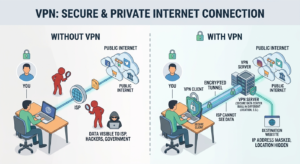
When you browse the internet without a VPN, websites and network operators can see information such as your IP address and approximate location. On unsecured networks, your internet traffic may also be more vulnerable to interception. Additionally, visiting malicious websites or falling for online scams can put your personal data and privacy at risk.
A VPN helps reduce these risks by encrypting your internet traffic and masking your real IP address. This makes it more difficult for third parties to monitor your online activity while improving your privacy and security. In the following sections of this review, we’ll explore the features NordVPN offers to help protect your online experience.
What is VPN ?
A VPN (Virtual Private Network) is a virtual network that encrypts a connected device’s information, including its IP address, location, and other data, making it invisible to the public network. It provides users with enhanced security, greater privacy, and easier access to various online services and applications, such as streaming, gaming, and file sharing.
how does VPN works ?
Instead of connecting directly to a website or online server, your internet traffic is first routed through a secure VPN server. Before leaving your device, the VPN encrypts your data and sends it through an encrypted tunnel to the VPN server. The VPN server then decrypts your request and forwards it to the destination website or online service.
When the website sends a response, it is first returned to the VPN server. The VPN server encrypts the data again and securely transmits it back to your device through the encrypted tunnel. This process helps protect your internet traffic from unauthorized access while hiding your real IP address from the websites you visit.
People use VPNs for many reasons, including improving online privacy, protecting their internet connection on public Wi-Fi, accessing region-restricted content, reducing online tracking, and adding privacy when sharing files. Some gamers also use VPNs to protect their IP addresses or connect through different server locations, although a VPN does not always improve gaming performance.
NordVPN Features
It’s time to explore some of NordVPN’s most important features and the benefits you will get after subscribing to and installing the service :
Encryption

Encryption is the method NordVPN uses to protect the confidentiality of your internet connection by encoding your internet traffic using encryption algorithms. This makes your data difficult for unauthorized parties to read while it is being transmitted.
Threat Protection

NordVPN offers strong security by analyzing the websites and files you access. If it detects malware or other online threats, it blocks them immediately to help keep your device safe.
Kill Switch
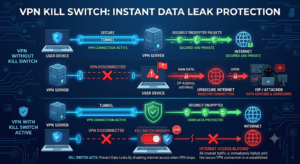
Imagine you are connected to a public network using a NordVPN connection. After a while, the VPN connection suddenly stops. Your privacy will no longer be protected, and your real IP address could become visible. The Kill Switch provides a solution by immediately disconnecting your internet connection if NordVPN stops working, helping prevent websites and online services from seeing your real IP address and location.
Meshnet
Meshnet is a free NordVPN feature that allows you to create your own private network by securely connecting multiple devices over the internet. It acts like a virtual local area network (LAN), enabling devices to communicate safely even when they are located in different countries. Meshnet is useful for secure file sharing, remote access to your own devices, and collaborative projects.
Double VPN
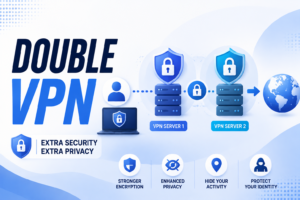
With a standard VPN connection, your internet traffic is encrypted and routed through a single VPN server before reaching its destination. Double VPN adds an extra layer of protection by routing your traffic through two VPN servers instead of one. Your data is encrypted twice, making it more difficult for third parties to monitor your connection. This feature is especially useful for users who require an additional level of privacy and security.
Dedicated IP

By default, multiple users connected to the same VPN server often share a single public IP address. With a Dedicated IP, you are assigned a unique IP address that is used only by you. This can reduce the chances of IP-based restrictions, CAPTCHAs, and blocked connections while providing a more consistent online experience. A Dedicated IP is particularly useful for accessing business networks, hosting services, or websites that require a trusted and stable IP address.
Split Tunneling
Split Tunneling is a feature that lets you choose which apps or websites use the VPN connection and which connect directly to the internet. This allows you to route sensitive activities through the VPN while letting other applications use your regular internet connection. As a result, you can improve flexibility, maintain access to local network services, and use the VPN only when it is needed.
Obfuscated Servers
Obfuscated Servers are specialized VPN servers that disguise VPN traffic as regular internet traffic. This makes it more difficult for networks, internet service providers (ISPs), or systems that restrict VPN usage to detect that you are connected to a VPN. They are particularly useful in environments where VPN traffic is limited or blocked.
Dark Web Monitor
Dark Web Monitor is a security feature that continuously checks whether the email address associated with your NordVPN account appears in known dark web data breaches. If your credentials are detected, NordVPN alerts you so that you can change your passwords and secure your accounts before they are misused.
No-Logs Policy
NordVPN’s No-Logs Policy means that the service does not store records of your browsing activity, connection timestamps, IP addresses, or the websites you visit while using the VPN. This policy is designed to protect your privacy by ensuring that your online activity is not retained on NordVPN’s servers.
NordLynx Protocol
NordLynx is NordVPN’s proprietary VPN protocol built around the WireGuard protocol. It is designed to deliver fast connection speeds while maintaining a high level of security and privacy. NordLynx combines the performance benefits of WireGuard with additional privacy mechanisms, making it one of NordVPN’s most efficient connection protocols.
Security & Privacy

1. VPN protocols
A VPN protocol determines how your device establishes a secure connection with a VPN server. NordVPN supports multiple protocols, including NordLynx, OpenVPN, and IKEv2/IPsec. Each protocol offers a different balance of speed, security, and compatibility, allowing users to choose the option that best suits their needs.
2. No-Logs Policy
NordVPN follows a strict no-logs policy, meaning it does not record your browsing activity, connection logs, or the websites you visit while connected to the VPN. This policy is intended to protect your privacy by ensuring that your online activity is not stored on NordVPN’s VPN servers.
3. RAM-Only Servers
NordVPN operates RAM-only servers, which store data only in temporary memory (RAM) instead of traditional hard drives. Because RAM is automatically cleared whenever a server is restarted, no user data remains stored on the server after a reboot. This design provides an additional layer of security and helps reduce the risk of sensitive data being recovered.
4. Independent Audits
NordVPN’s no-logs policy and parts of its security infrastructure have been independently audited by third-party cybersecurity firms. These audits help verify that NordVPN’s privacy practices and security claims are implemented as described, increasing transparency and user confidence.
5. Jurisdiction
NordVPN is based in Panama, a country that does not have mandatory data retention laws for VPN providers. This jurisdiction supports NordVPN’s privacy-focused approach and helps the company operate its no-logs policy without being subject to mandatory logging requirements under Panamanian law.
6. Speed Performance
Speed is one of the most important factors when choosing a VPN. While using a VPN may introduce a slight reduction in connection speed due to encryption and traffic routing, NordVPN is designed to minimize this impact through its high-speed server network and modern VPN protocols.
7. Download Speed
Download speeds depend on several factors, including your internet service provider (ISP), the distance to the selected VPN server, server load, and your chosen VPN protocol. Connecting to a nearby server generally provides the best performance for browsing, streaming, and downloading large files.
8. Upload Speed
Upload performance is influenced by the same factors as download speed. A nearby VPN server and a stable internet connection can help maintain fast upload speeds for cloud storage, video conferencing, and file sharing.
9. Ping
Using a VPN typically increases ping because your internet traffic travels through a VPN server before reaching its destination. However, selecting a server close to your location can help reduce latency and provide a smoother experience for gaming, video calls, and other real-time applications.
10. NordLynx Performance
NordLynx is NordVPN’s high-performance VPN protocol built on WireGuard technology. It is designed to deliver fast connection speeds while maintaining strong encryption and user privacy. For most users, NordLynx provides an excellent balance between speed, security, and reliability.
11. Real-World Performance
In everyday use, NordVPN is designed to provide a smooth experience for common online activities such as web browsing, streaming, online gaming, video conferencing, and file downloads. Actual performance may vary depending on your internet connection, server location, network congestion, and the capabilities of your device.
Streaming Performance

Streaming is one of the most popular reasons people use a VPN. NordVPN is designed to provide fast, secure connections and a global server network that supports access to major streaming platforms. However, streaming availability may change over time because streaming services regularly update their VPN detection methods.
Netflix
NordVPN provides servers in numerous countries, allowing users to access different regional Netflix libraries where available. With a stable internet connection, it is designed to support high-definition and 4K streaming.
Disney+
NordVPN is compatible with Disney+ and offers high-speed servers that help deliver a smooth streaming experience. Performance depends on your internet connection, server location, and network conditions.
Hulu
NordVPN supports Hulu through servers located in supported regions. Users must have a valid Hulu subscription and comply with the platform’s terms of service and regional availability requirements.
Amazon Prime Video
NordVPN can be used with Amazon Prime Video by connecting to servers in supported locations. Content availability depends on regional licensing agreements and the platform’s own policies.
BBC iPlayer
NordVPN offers servers in the United Kingdom that are intended to support access to BBC iPlayer for users who meet the service’s eligibility requirements.
Buffering
Buffering is influenced by factors such as internet speed, server distance, network congestion, and server load. Connecting to a nearby server and using the NordLynx protocol can help reduce buffering and improve playback stability.
Video Quality
A fast and stable VPN connection can support HD and 4K streaming when sufficient bandwidth is available. The final video quality depends on your internet connection, the selected VPN server, and the streaming service’s performance.
SmartPlay
SmartPlay is a NordVPN technology that combines VPN encryption with Smart DNS functionality. It is designed to improve compatibility with supported streaming services while maintaining an encrypted connection, allowing users to stream without additional manual configuration.
Torrenting & P2P
NordVPN supports peer-to-peer (P2P) file sharing through dedicated P2P servers that are optimized for handling torrent traffic. These servers are designed to provide a secure, stable, and efficient connection for users who share or download files using P2P applications.
P2P Servers
NordVPN offers specialized servers that are optimized for peer-to-peer traffic. If P2P activity is detected on a server that is not intended for torrenting, NordVPN may automatically redirect the connection to a dedicated P2P server to help maintain performance and reliability.
Download Performance

Download performance depends on several factors, including your internet connection, server location, server load, the number of peers sharing the file, and the selected VPN protocol. Choosing a nearby P2P server and using the NordLynx protocol can help deliver faster and more stable download speeds.
Security
NordVPN encrypts your P2P traffic to help protect it from unauthorized interception while files are being transferred. Security features such as the Kill Switch can also help prevent your real IP address from being exposed if the VPN connection unexpectedly drops.
Privacy
By replacing your public IP address with the IP address of the VPN server, NordVPN helps improve your privacy during P2P file sharing. Other peers see the VPN server’s IP address instead of your own, making it more difficult to identify your real network location. Users should always respect applicable laws and share only content they are authorized to distribute or download.
Gaming Performance

NordVPN is designed to provide a secure and stable connection for online gaming. Although using a VPN can slightly increase latency because your traffic is routed through a VPN server, selecting a nearby server and using the NordLynx protocol can help minimize this impact while maintaining strong security.
Ping
Ping, or latency, is an important factor in online gaming. Connecting through a nearby VPN server generally results in lower latency than using a distant server. Actual ping depends on your internet connection, server location, network congestion, and the game’s servers.
Stability
A stable VPN connection helps reduce unexpected disconnections during online gaming sessions. NordVPN’s global server network and NordLynx protocol are designed to provide reliable performance, although connection quality may vary depending on network conditions and server load.
DDoS Protection

NordVPN helps protect gamers from Distributed Denial-of-Service (DDoS) attacks by masking their public IP address. Since other players and game servers see the VPN server’s IP address instead of the user’s real IP address, it becomes more difficult for attackers to target the user’s home network directly.
Nearby Servers

NordVPN offers thousands of servers across many countries, allowing users to connect to a server close to their physical location. Choosing a nearby server can help reduce latency and maintain a smoother gaming experience while still benefiting from VPN encryption and privacy.
Server Network
A large server network is essential for delivering fast connections, reducing server congestion, and providing access to content from different regions. NordVPN operates one of the world’s largest VPN infrastructures, giving users a wide selection of server locations for browsing, streaming, gaming, and secure online activities.
Number of Countries
NordVPN’s server network spans more than 167 countries, allowing users to connect to servers across North America, South America, Europe, Asia, Africa, and Oceania. This broad geographic coverage helps users find nearby servers for better performance while also providing access to region-specific online content.
Number of Servers
NordVPN operates more than 8,900 servers worldwide. A large number of servers helps distribute user traffic more efficiently, reducing congestion and improving connection reliability during peak usage periods.
Specialty Servers
In addition to standard VPN servers, NordVPN offers several specialized server categories designed for specific use cases:
P2P Servers – Optimized for peer-to-peer file sharing and torrenting.
Double VPN Servers – Route traffic through two VPN servers, adding an extra layer of encryption.
Obfuscated Servers – Conceal VPN traffic to make it appear as regular internet traffic, helping in networks where VPN connections may be restricted.
Dedicated IP Servers – Provide users with a unique IP address that is not shared with other VPN users.
Onion Over VPN Servers – Combine VPN encryption with access to the Tor network for enhanced privacy.
Ease of Use
NordVPN is designed with a user-friendly interface that makes it easy for both beginners and experienced users to secure their internet connection. The installation process is straightforward, and the applications provide quick access to essential features across different devices.
Installation
Installing NordVPN is a simple process. Users download the application for their operating system, sign in to their account, and follow the on-screen instructions. Once installed, they can connect to a VPN server with just a few clicks.
Desktop Apps

NordVPN offers dedicated applications for Windows, macOS, and Linux. The desktop apps provide access to features such as Quick Connect, server selection, specialty servers, Threat Protection, Meshnet, and connection settings through a clean and organized interface.
Mobile Apps
NordVPN’s mobile applications for Android and iOS are designed for secure browsing while on the move. They include many of the same core features as the desktop version, allowing users to connect quickly, change server locations, and manage VPN settings from their smartphones or tablets.
Browser Extensions
NordVPN provides browser extensions for Google Chrome, Mozilla Firefox, and Microsoft Edge. These extensions secure browser traffic, allow users to change virtual locations, and offer convenient access to VPN features directly from the browser.
User Interface
The user interface is designed to be intuitive and easy to navigate. Users can connect using the Quick Connect button, search for specific countries or servers, and access advanced features through clearly organized menus. This layout makes it simple to use the VPN without requiring advanced technical knowledge.
Device Compatibility
NordVPN is compatible with a wide range of devices and operating systems, allowing users to protect multiple devices under a single account. Whether you use a computer, smartphone, smart TV, or router, NordVPN offers applications or setup guides for most major platforms.
Windows
NordVPN provides a dedicated Windows application with features such as Quick Connect, specialty servers, Threat Protection, Meshnet, Kill Switch, and customizable connection settings.
macOS
The macOS application offers a user-friendly interface and includes core security features such as NordLynx, Kill Switch, Meshnet, and specialty servers for a secure browsing experience.
Linux
NordVPN supports Linux through a command-line interface (CLI), giving users access to essential VPN features, including NordLynx, OpenVPN, Meshnet, and specialty servers.
Android
The Android app allows users to secure their internet connection with a single tap. It supports features such as Quick Connect, Threat Protection, Meshnet, Split Tunneling, and automatic connection options.
iPhone and iPad
NordVPN’s iOS and iPadOS applications provide a simple interface for protecting internet traffic on Apple devices. Users can quickly connect to servers, change locations, and manage their VPN settings.
Smart TVs
NordVPN is compatible with Android TV and Amazon Fire TV devices through dedicated applications. Other smart TVs can also benefit from VPN protection by connecting through a compatible router or supported Smart DNS features where available.
Routers
Installing NordVPN on a compatible router protects every device connected to the home network, including devices that do not support VPN applications directly, such as some smart TVs and gaming consoles.
Browser Extensions
NordVPN offers browser extensions for Google Chrome, Mozilla Firefox, and Microsoft Edge. These extensions help secure browser traffic, provide quick access to VPN features, and allow users to change their virtual location directly from the browser.
Customer Support
Reliable customer support is an important factor when choosing a VPN service, especially for users who need help with installation, troubleshooting, or account management. NordVPN provides several support options to assist users whenever they encounter an issue.
Live Chat
NordVPN offers 24/7 live chat support, allowing users to receive real-time assistance for technical problems, billing questions, and general inquiries.
Email Support
Users can also contact the support team by email for more detailed questions or issues that require further investigation.
Knowledge Base
NordVPN maintains a comprehensive online knowledge base containing setup guides, troubleshooting articles, feature explanations, and frequently asked questions for a wide range of devices.
Tutorials
Step-by-step tutorials are available to help users install, configure, and use NordVPN on different operating systems, browsers, routers, and other supported devices.
Pricing & Plans
NordVPN offers several subscription plans designed to meet different budgets and usage needs. Longer subscription periods typically provide a lower monthly cost than the monthly plan.
Monthly Plan
The monthly subscription offers maximum flexibility without a long-term commitment, making it suitable for users who only need a VPN for a short period.
Annual Plan
The annual plan reduces the effective monthly price compared with the monthly subscription while providing the same features and security benefits.
Two-Year Plan
The two-year plan generally offers the best overall value by providing the lowest monthly cost among NordVPN’s standard subscription options.
Free Trial
NordVPN does not generally offer a universal free trial for all platforms. Availability may vary depending on the platform or promotional offers.
Money-Back Guarantee
NordVPN provides a 30-day money-back guarantee, allowing eligible customers to request a refund if they are not satisfied with the service, subject to the company’s refund policy.
Pros & Cons
Pros
-
- Strong encryption and modern security features.
-
- Fast performance with the NordLynx protocol.
-
- Large global server network.
-
- User-friendly applications across multiple platforms.
-
- Dedicated specialty servers for different use cases.
-
- Supports streaming, gaming, and P2P file sharing.
-
- Independently audited no-logs policy.
Cons
-
- The monthly subscription is more expensive than long-term plans.
-
- Some advanced features may be unnecessary for casual users.
-
- Certain features vary depending on the operating system.
-
- Like any VPN, connection speed may decrease slightly depending on server location and network conditions.
NordVPN vs Competitors
NordVPN vs ExpressVPN
Both services provide strong security, fast performance, and broad device compatibility. NordVPN offers a larger selection of advanced features, while ExpressVPN is widely recognized for its simplicity and ease of use.
NordVPN vs Surfshark
Surfshark is generally more affordable and supports unlimited simultaneous device connections. NordVPN focuses on premium security features, specialty servers, and consistently strong performance.
NordVPN vs Proton VPN
Proton VPN emphasizes privacy and also offers a free plan with limitations. NordVPN provides a larger server network, more specialty features, and additional tools designed for streaming and advanced security.
NordVPN vs CyberGhost
CyberGhost offers an intuitive interface and streaming-focused servers. NordVPN provides a broader range of security features, higher overall flexibility, and a larger selection of specialty servers.
Who Should Buy NordVPN?
NordVPN is suitable for a wide variety of users, including:
Travelers who want to protect their internet connection while using public Wi-Fi and access online services when abroad.
Streamers looking for fast connections and broad compatibility with popular streaming platforms.
Gamers who want secure connections, DDoS protection, and access to nearby VPN servers.
Remote Workers who need encrypted internet connections when accessing company resources or working from public networks.
Privacy-Focused Users who want to encrypt their internet traffic and reduce the amount of personal information exposed online.
Frequently Asked Questions (FAQ)
Is NordVPN safe?
Yes. NordVPN uses strong encryption, secure VPN protocols, and a verified no-logs policy designed to protect users’ online privacy.
Is NordVPN worth it?
For users who value privacy, security, streaming support, and a large server network, NordVPN offers a comprehensive set of features that many users find worthwhile.
Does NordVPN work with Netflix?
NordVPN is designed to support Netflix by providing access to servers in multiple countries. Availability may change over time because streaming services regularly update their VPN detection systems.
Can NordVPN be trusted?
NordVPN has undergone independent security audits and maintains a no-logs policy, helping increase transparency and user confidence.
Is there a free version?
No. NordVPN is a paid VPN service, although eligible users are generally covered by a 30-day money-back guarantee.
How many devices can I connect?
A single NordVPN subscription allows users to protect up to 10 devices simultaneously under one account.
Final Verdict
NordVPN is a feature-rich VPN service that combines strong security, fast performance, and a large global server network. Its advanced features, including NordLynx, Double VPN, Meshnet, Threat Protection, and specialty servers, make it suitable for a wide range of online activities, from secure browsing and streaming to gaming and remote work.
Although the monthly subscription is relatively expensive compared with the long-term plans, the service provides excellent overall value through its comprehensive feature set, user-friendly applications, and broad device compatibility. Casual users may not need every advanced feature, but they benefit from the same high level of security and ease of use.
Overall, NordVPN is a strong choice for users who want a reliable VPN that balances speed, privacy, and security. It is particularly well suited for travelers, streamers, gamers, remote workers, and anyone looking to protect their online activity. If you are searching for a premium VPN with a proven reputation and a wide range of features, NordVPN is a service worth considering.